
Teslamate sur Raspberry Pi - Tutoriel


Re: Teslamate sur Raspberry Pi - Tutoriel
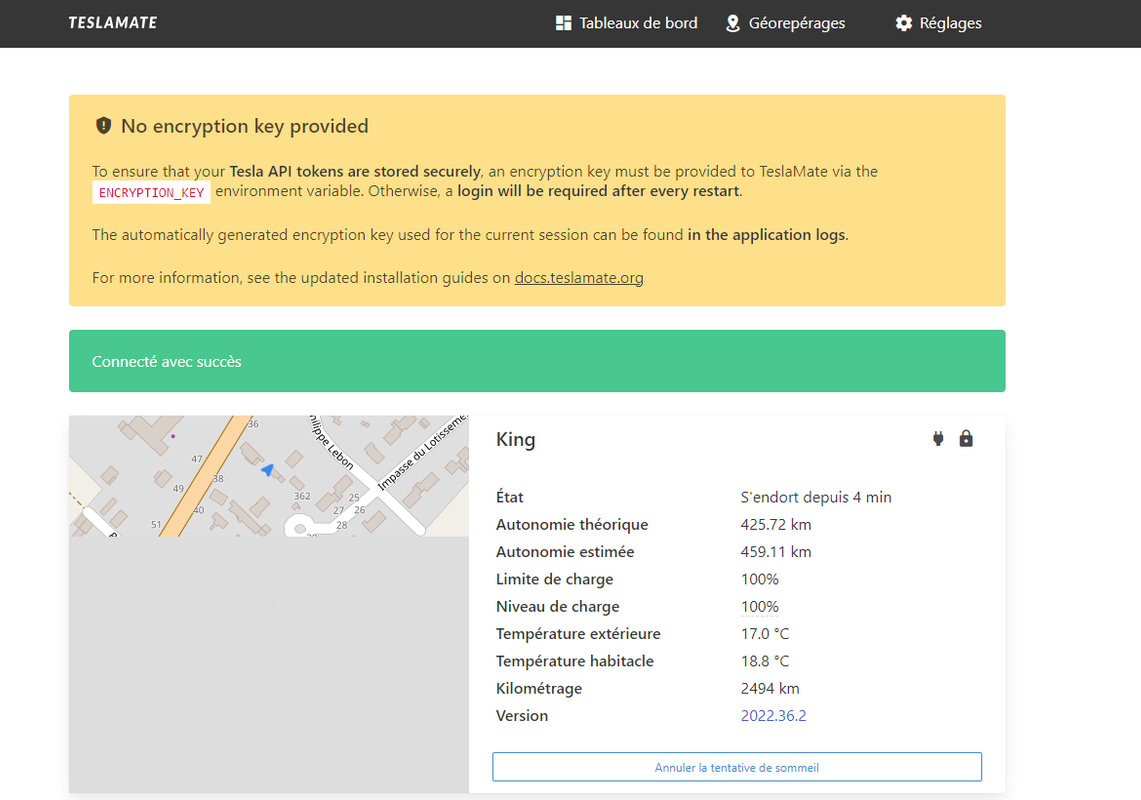
Je me suis deployé mon teslamate, mais niveau sécurisation de l'accés, il existe un truc ? car c'est un peu free en accés...
Les Zhoms en Tesla Model 3 Performance (2022) Grise, intérieur blanc, AP amélioré (Parait-il).
-
Thomas

- Community Manager

- Messages : 29568
- Inscription : 18 déc. 2018
- Localisation : IdF
- Voiture : Model Y Perf
- Contact :
Re: Teslamate sur Raspberry Pi - Tutoriel
Tu as ouvert des ports sur ta box pour qu'il soit accessible depuis l'extérieur ?
Re: Teslamate sur Raspberry Pi - Tutoriel
On va faire plus simple :)
Je travaille dans l'informatique et je me suis déployé une VM dans mon datacenter
Ca marche impec, mais clairement l'accès au teslamate n'est pas protégé... même pas un password, si tu as mon url, tu peux tout savoir sur ma vie :)
Alors je suis derrière un proxy, donc faut l'url exacte pour se connecter, mais c'est une passoire à information ce truc.
Même les Jetons d'authentification à l'api sont transmis en clair...
Du coup j'ai renoncé à l'appli portable. Des ports en plus à ouvrir et surtout je suis pas chaud pour filer ces info aux dev de l'app.
Je ne suis pas parano, mais un minimum de sécurisation serait la bienvenue. Il y a tous nos déplacements, nos habitudes de garage, la situation en temps réel de la voiture, etc... On parlait des risques de vol sur un autre thread... La on bat les records.
Je travaille dans l'informatique et je me suis déployé une VM dans mon datacenter
Ca marche impec, mais clairement l'accès au teslamate n'est pas protégé... même pas un password, si tu as mon url, tu peux tout savoir sur ma vie :)
Alors je suis derrière un proxy, donc faut l'url exacte pour se connecter, mais c'est une passoire à information ce truc.
Même les Jetons d'authentification à l'api sont transmis en clair...
Du coup j'ai renoncé à l'appli portable. Des ports en plus à ouvrir et surtout je suis pas chaud pour filer ces info aux dev de l'app.
Je ne suis pas parano, mais un minimum de sécurisation serait la bienvenue. Il y a tous nos déplacements, nos habitudes de garage, la situation en temps réel de la voiture, etc... On parlait des risques de vol sur un autre thread... La on bat les records.
Les Zhoms en Tesla Model 3 Performance (2022) Grise, intérieur blanc, AP amélioré (Parait-il).
-
Thomas
- Community Manager
- Messages : 29568
- Inscription : 18 déc. 2018
- Localisation : IdF
- Voiture : Model Y Perf
- Contact :
Re: Teslamate sur Raspberry Pi - Tutoriel
Par défaut c'est surtout prévu pour être hébergé à la maison derrière une box avec un firewall et un NAT donc sans accès depuis l'extérieur.
Dans ton cas c'est évidement à modifier pour protéger tes données. Tu peux suivre les Docs ici pour installer un Traefik par exemple afin d'avoir une authentification : https://docs.teslamate.org/docs/guides/traefik
Dans ton cas c'est évidement à modifier pour protéger tes données. Tu peux suivre les Docs ici pour installer un Traefik par exemple afin d'avoir une authentification : https://docs.teslamate.org/docs/guides/traefik
- donald9696
- Actif

- Messages : 10
- Inscription : 08 août 2022
- Voiture : Modèle 3
Re: Teslamate sur Raspberry Pi - Tutoriel
Bonjour à vous , je viens d'installer TeslaMate sur mon server ubuntu via docker . tout est ok mais j'ai pas de données sur graphana . j'ai loupé quelque chose ?
TM3 Grise 29/01/2022 livraison à valenton 27/09 à 9h
-
Yams

- Enthousiaste

- Messages : 155
- Inscription : 26 mai 2022
- Localisation : Var
- Voiture : Model 3 Propulsion
Re: Teslamate sur Raspberry Pi - Tutoriel
Il faut rouler un peu pour voir les premières données apparaître. Car, sauf erreur, ce n’est pas rétroactif !
M3 Prop. - Bleu - Int. Noir - Jantes 18"
- donald9696
- Actif
- Messages : 10
- Inscription : 08 août 2022
- Voiture : Modèle 3
Re: Teslamate sur Raspberry Pi - Tutoriel
Ah yes merci Tu sais si on peut voir la degradation de la batterie avec teslaMate ?
Tu sais si on peut voir la degradation de la batterie avec teslaMate ?TM3 Grise 29/01/2022 livraison à valenton 27/09 à 9h
- donald9696
- Actif
- Messages : 10
- Inscription : 08 août 2022
- Voiture : Modèle 3
Re: Teslamate sur Raspberry Pi - Tutoriel
Bonjour, depuis que j'ai installé TeslaMate je remarques une perte d'autonomie de 2 à 3 % par jours quand je suis garé (sans mode sentinelle ). Est ce normale ?
TM3 Grise 29/01/2022 livraison à valenton 27/09 à 9h
Re: Teslamate sur Raspberry Pi - Tutoriel
@Thomas
Merci pour le tuyau, mais étant derriere un proxy, ça ne peut pas marché... je vais peutetre refaire l'installation autrement
Merci pour le tuyau, mais étant derriere un proxy, ça ne peut pas marché... je vais peutetre refaire l'installation autrement
Les Zhoms en Tesla Model 3 Performance (2022) Grise, intérieur blanc, AP amélioré (Parait-il).
Re: Teslamate sur Raspberry Pi - Tutoriel
Bonjour,
Depuis ce matin, j'ai un pb de connexion avec Teslamate: lorsque je lance : 192.168.XXX.XXX:4000 je tombe bien sur ma page d'accueil de teslamate, mais lorsque j'essaie de rentrer sur Tableau de bord ( ce qui correspond à192.168.XXX.XXX:3000, je tombe sur la page d'accueil de Grafana. Avant je rentrais le couple admin/admin en login et password , mais maintenant cela ne fonctionne plus .
Quelqu'un à une idée ?
Merci
Depuis ce matin, j'ai un pb de connexion avec Teslamate: lorsque je lance : 192.168.XXX.XXX:4000 je tombe bien sur ma page d'accueil de teslamate, mais lorsque j'essaie de rentrer sur Tableau de bord ( ce qui correspond à192.168.XXX.XXX:3000, je tombe sur la page d'accueil de Grafana. Avant je rentrais le couple admin/admin en login et password , mais maintenant cela ne fonctionne plus .
Quelqu'un à une idée ?
Merci
TM3 Perf Blanche - Commande 19/02- VIN 25/05 - Livraison 21/06
Re: Teslamate sur Raspberry Pi - Tutoriel
Je me réponds à moi même; j'ai trouvé après avoir fait un Raz du MDP.
Merci quand même.
Merci quand même.
TM3 Perf Blanche - Commande 19/02- VIN 25/05 - Livraison 21/06

Re: Teslamate sur Raspberry Pi - Tutoriel
Bonjour A tous.
J'ai un problème pour l'installation de Teslamate sur Pi3
Je bloque à l'installation;
sudo pip3 install docker-compose
Me sort une erreur de version visiblement. voici le résultat de la commande précédente:
Quelqu'un pour m'aider ? 
J'ai un problème pour l'installation de Teslamate sur Pi3
Je bloque à l'installation;
sudo pip3 install docker-compose
Me sort une erreur de version visiblement. voici le résultat de la commande précédente:
Code : Tout sélectionner
pi@raspberrypi:~ $ sudo pip3 install docker-compose
Looking in indexes: https://pypi.org/simple, https://www.piwheels.org/simple
Collecting docker-compose
  Using cached https://www.piwheels.org/simple/docker-compose/docker_compose-1.29.2-py2.py3-none-any.whl (114 kB)
Collecting texttable<2,>=0.9.0
  Using cached https://www.piwheels.org/simple/texttable/texttable-1.6.4-py2.py3-none-any.whl (10 kB)
Collecting docopt<1,>=0.6.1
  Using cached https://www.piwheels.org/simple/docopt/docopt-0.6.2-py2.py3-none-any.whl (13 kB)
Collecting websocket-client<1,>=0.32.0
  Using cached https://www.piwheels.org/simple/websocket-client/websocket_client-0.59.0-py2.py3-none-any.whl (67 kB)
Collecting jsonschema<4,>=2.5.1
  Using cached https://www.piwheels.org/simple/jsonschema/jsonschema-3.2.0-py2.py3-none-any.whl (56 kB)
Collecting docker[ssh]>=5
  Using cached https://www.piwheels.org/simple/docker/docker-6.0.1-py3-none-any.whl (147 kB)
Collecting dockerpty<1,>=0.4.1
  Using cached https://www.piwheels.org/simple/dockerpty/dockerpty-0.4.1-py3-none-any.whl (16 kB)
Requirement already satisfied: distro<2,>=1.5.0 in /usr/lib/python3/dist-packages (from docker-compose) (1.5.0)
Collecting python-dotenv<1,>=0.13.0
  Using cached https://www.piwheels.org/simple/python-dotenv/python_dotenv-0.21.0-py3-none-any.whl (18 kB)
Collecting PyYAML<6,>=3.10
  Using cached https://www.piwheels.org/simple/pyyaml/PyYAML-5.4.1-cp39-cp39-linux_armv7l.whl (45 kB)
Requirement already satisfied: requests<3,>=2.20.0 in /usr/lib/python3/dist-packages (from docker-compose) (2.25.1)
Collecting requests<3,>=2.20.0
  Using cached https://www.piwheels.org/simple/requests/requests-2.28.1-py3-none-any.whl (62 kB)
Requirement already satisfied: urllib3>=1.26.0 in /usr/lib/python3/dist-packages (from docker[ssh]>=5->docker-compose) (1.26.5)
Collecting packaging>=14.0
  Using cached https://www.piwheels.org/simple/packaging/packaging-21.3-py3-none-any.whl (40 kB)
Collecting paramiko>=2.4.3
  Using cached https://www.piwheels.org/simple/paramiko/paramiko-2.12.0-py2.py3-none-any.whl (213 kB)
Requirement already satisfied: six>=1.3.0 in /usr/lib/python3/dist-packages (from dockerpty<1,>=0.4.1->docker-compose) (1.16.0)
Collecting attrs>=17.4.0
  Using cached https://www.piwheels.org/simple/attrs/attrs-22.1.0-py2.py3-none-any.whl (58 kB)
Requirement already satisfied: setuptools in /usr/lib/python3/dist-packages (from jsonschema<4,>=2.5.1->docker-compose) (52.0.0)
Collecting pyrsistent>=0.14.0
  Using cached https://www.piwheels.org/simple/pyrsistent/pyrsistent-0.19.2-cp39-cp39-linux_armv7l.whl (102 kB)
Collecting charset-normalizer<3,>=2
  Using cached https://www.piwheels.org/simple/charset-normalizer/charset_normalizer-2.1.1-py3-none-any.whl (39 kB)
Requirement already satisfied: certifi>=2017.4.17 in /usr/lib/python3/dist-packages (from requests<3,>=2.20.0->docker-compose) (2020.6.20)
Requirement already satisfied: idna<4,>=2.5 in /usr/lib/python3/dist-packages (from requests<3,>=2.20.0->docker-compose) (2.10)
Collecting pyparsing!=3.0.5,>=2.0.2
  Using cached https://www.piwheels.org/simple/pyparsing/pyparsing-3.0.9-py3-none-any.whl (98 kB)
Requirement already satisfied: cryptography>=2.5 in /usr/lib/python3/dist-packages (from paramiko>=2.4.3->docker[ssh]>=5->docker-compose) (3.3.2)
Collecting bcrypt>=3.1.3
  Using cached bcrypt-4.0.1.tar.gz (25 kB)
  Installing build dependencies ... done
  Getting requirements to build wheel ... done
  Preparing metadata (pyproject.toml) ... done
Collecting pynacl>=1.0.1
  Using cached https://www.piwheels.org/simple/pynacl/PyNaCl-1.5.0-cp39-cp39-linux_armv7l.whl (585 kB)
Collecting cffi>=1.4.1
  Using cached https://www.piwheels.org/simple/cffi/cffi-1.15.1-cp39-cp39-linux_armv7l.whl (364 kB)
Collecting pycparser
  Using cached https://www.piwheels.org/simple/pycparser/pycparser-2.21-py2.py3-none-any.whl (119 kB)
Building wheels for collected packages: bcrypt
  Building wheel for bcrypt (pyproject.toml) ... error
  error: subprocess-exited-with-error

  × Building wheel for bcrypt (pyproject.toml) did not run successfully.
  │ exit code: 1
  ╰─> [58 lines of output]
      running bdist_wheel
      running build
      running build_py
      creating build
      creating build/lib.linux-armv7l-cpython-39
      creating build/lib.linux-armv7l-cpython-39/bcrypt
      copying src/bcrypt/__about__.py -> build/lib.linux-armv7l-cpython-39/bcrypt
      copying src/bcrypt/__init__.py -> build/lib.linux-armv7l-cpython-39/bcrypt
      running egg_info
      writing src/bcrypt.egg-info/PKG-INFO
      writing dependency_links to src/bcrypt.egg-info/dependency_links.txt
      writing requirements to src/bcrypt.egg-info/requires.txt
      writing top-level names to src/bcrypt.egg-info/top_level.txt
      reading manifest file 'src/bcrypt.egg-info/SOURCES.txt'
      reading manifest template 'MANIFEST.in'
      warning: no previously-included files found matching 'requirements.txt'
      warning: no previously-included files found matching 'release.py'
      warning: no previously-included files found matching 'mypy.ini'
      warning: no previously-included files matching '*' found under directory '.github'
      warning: no previously-included files matching '*' found under directory '.circleci'
      warning: no previously-included files found matching 'src/_bcrypt/target'
      warning: no previously-included files matching '*' found under directory 'src/_bcrypt/target'
      adding license file 'LICENSE'
      writing manifest file 'src/bcrypt.egg-info/SOURCES.txt'
      copying src/bcrypt/_bcrypt.pyi -> build/lib.linux-armv7l-cpython-39/bcrypt
      copying src/bcrypt/py.typed -> build/lib.linux-armv7l-cpython-39/bcrypt
      running build_ext
      running build_rust

          =============================DEBUG ASSISTANCE=============================
          If you are seeing a compilation error please try the following steps to
          successfully install bcrypt:
          1) Upgrade to the latest pip and try again. This will fix errors for most
             users. See: https://pip.pypa.io/en/stable/installing/#upgrading-pip
          2) Ensure you have a recent Rust toolchain installed. bcrypt requires
             rustc >= 1.56.0.

          Python: 3.9.2
          platform: Linux-5.15.61-v7l+-armv7l-with-glibc2.31
          pip: n/a
          setuptools: 65.5.1
          setuptools_rust: 1.5.2
          rustc: n/a
          =============================DEBUG ASSISTANCE=============================

      error: can't find Rust compiler

      If you are using an outdated pip version, it is possible a prebuilt wheel is available for this package but pip is not able to install from it. Installing from the wheel would avoid the need for a Rust compiler.

      To update pip, run:

          pip install --upgrade pip

      and then retry package installation.

      If you did intend to build this package from source, try installing a Rust compiler from your system package manager and ensure it is on the PATH during installation. Alternatively, rustup (available at https://rustup.rs) is the recommended way to download and update the Rust compiler toolchain.

      This package requires Rust >=1.56.0.
      [end of output]

  note: This error originates from a subprocess, and is likely not a problem with pip.
  ERROR: Failed building wheel for bcrypt
Failed to build bcrypt
ERROR: Could not build wheels for bcrypt, which is required to install pyproject.toml-based projects
pi@raspberrypi:~ $
Re: Teslamate sur Raspberry Pi - Tutoriel
T’as essayé ca ?
error: can't find Rust compiler
If you are using an outdated pip version, it is possible a prebuilt wheel is available for this package but pip is not able to install from it. Installing from the wheel would avoid the need for a Rust compiler.
To update pip, run:
pip install --upgrade pip
and then retry package installation.
error: can't find Rust compiler
If you are using an outdated pip version, it is possible a prebuilt wheel is available for this package but pip is not able to install from it. Installing from the wheel would avoid the need for a Rust compiler.
To update pip, run:
pip install --upgrade pip
and then retry package installation.
50k km en TMY Perf Noir/Noir EAP volant sport
Présentation de ma Y Perf - Niark
Présentation de ma Y Perf - Niark


Re: Teslamate sur Raspberry Pi - Tutoriel
Et installer rust :
curl --proto '=https' --tlsv1.2 -sSf https://sh.rustup.rs | sh
Cette commande va télécharger le contenu qui se trouve sur l’url et l’executer (donc faire l’installation)
curl --proto '=https' --tlsv1.2 -sSf https://sh.rustup.rs | sh
Cette commande va télécharger le contenu qui se trouve sur l’url et l’executer (donc faire l’installation)
50k km en TMY Perf Noir/Noir EAP volant sport
Présentation de ma Y Perf - Niark
Présentation de ma Y Perf - Niark
Re: Teslamate sur Raspberry Pi - Tutoriel
idem, pourtant l'install se passe bien...
Re: Teslamate sur Raspberry Pi - Tutoriel
@JohnLO J'ai eu le même souci, c'est passé comme ça
Code : Tout sélectionner
apt install docker-composeModel 3 Prop Noire commandée le 7/02 pour Bordeaux en Mai ; VIN : 31 aout ; Livr : 28 sept
-
thierry

- Enthousiaste
- Messages : 130
- Inscription : 11 juil. 2021
- Localisation : France - 95
- Voiture : TM3 SR+ v18 (LFP)
Re: Teslamate sur Raspberry Pi - Tutoriel
@Firfin  J'avais également le problème "rust" (pi3, image raspios buster du 22/09/2022), ça a décoincé l'installation (ne pas oublier de rajouter un "sudo" devant la commande bien sûr).
J'avais également le problème "rust" (pi3, image raspios buster du 22/09/2022), ça a décoincé l'installation (ne pas oublier de rajouter un "sudo" devant la commande bien sûr).02/2014 : Opel Ampera 2012 ; 03/2021 : Mercedes A250e ; 09/2021 : TM3 SR+ 2021 (v18) rouge, MIC, LFP
-
captainkavern

- Confirmé

- Messages : 98
- Inscription : 15 sept. 2022
- Localisation : TOURS(37)
- Voiture : TM3 SR+ 2021
Re: Teslamate sur Raspberry Pi - Tutoriel
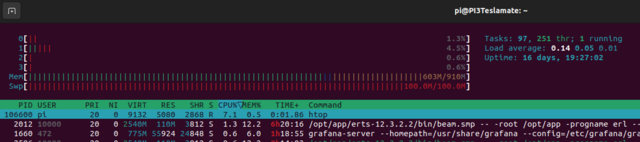
hello, quelques mois d'utilisation de teslamate sur un PI3, dans l'ensemble rien a redire, ça marche plutôt bien, juste un truc qui me chiffonne, vous constatez aussi des fuites mémoires du logiciel ?
-la charge cpu est peanuts
-l'activté Ram est "soutenue mais correcte" au 2/3
- et par contre j'ai un remplissage du swap de la machine en quelques jours ? obligé de rebooter le PI pour retrouver un swap "normal" .. vous avez pareil ?
-la charge cpu est peanuts
-l'activté Ram est "soutenue mais correcte" au 2/3
- et par contre j'ai un remplissage du swap de la machine en quelques jours ? obligé de rebooter le PI pour retrouver un swap "normal" .. vous avez pareil ?
Model 3 SR+ LFP55/3D1 - Full Blanche - Int./Ext. - Jantes 18" - Attelage
2021 - 50.000 km
2021 - 50.000 km
-
Thomas
- Community Manager
- Messages : 29568
- Inscription : 18 déc. 2018
- Localisation : IdF
- Voiture : Model Y Perf
- Contact :
Re: Teslamate sur Raspberry Pi - Tutoriel
Je n'ai pas regardé tout cela mais mon Pi tourne depuis des mois sans probléme.
Créer un compte ou se connecter pour rejoindre la discussion
Vous devez être membre pour pouvoir répondre
Créer un compte
Vous n‘êtes pas membre ? Inscrivez-vous pour rejoindre notre communauté
Les membres peuvent créer leurs propres sujets et s‘abonner à des sujets
C‘est gratuit et cela ne prend qu‘une minute